GRUVPAKT is an 8-track step sequencer / groovebox that runs on the M5Stack Tab5. Each track plays either samples (drum kits, one-shots) or one of five built-in synth engines (FM, Wavetable, Granular, Virtual Analog, Phase Distortion) — or drives an external device over USB-MIDI. You build patterns on a touch step-grid, arrange them into scenes, mix everything with the knobs, and save projects to the SD card.
The sequencer screen is your home base. It is divided into the regions below.
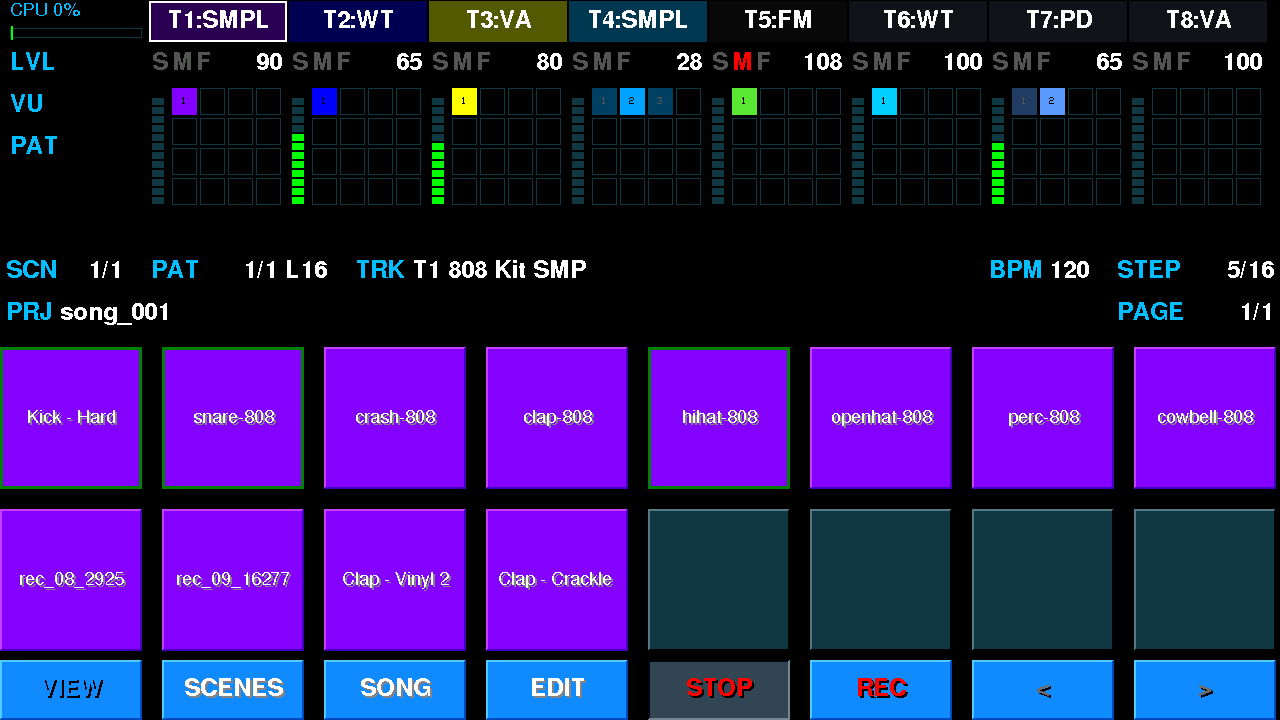
Top to bottom: the full-width LCD (track tabs T1–T8, the LVL level row, the VU meters and pattern chips, the project / BPM / step line), the 2×8 pad grid (here — a sample track's kit during playback) and the button row at the bottom. Emulator capture.
| Region | What it does |
|---|---|
| Button row (bottom) | Eight buttons, left to right: VIEW (pads ↔ pattern grid), SCENES (scene list on the pads, §10), SONG (the arranger, §11), EDIT (edit whatever is on the pads, §7), PLAY (start / stop), REC (note recording), < > (paging). Hold a modifier and the row shows its functions (below). |
| Track panel (T1–T8, top of the LCD) | Tabs T1–T8 along the top of the display with the track type (SMPL, WT, VA, GRAN, FM…). The framed tab is the current track. Under the tabs on the base page — the LVL row (level and the S M F marks: solo / mute / freeze), and below it, per track, a VU (vertical level meter: green → amber → red) and the track’s pattern chips 4×4 — the one playing in the current scene is filled with the track colour, other existing ones are paler, empty ones are just an outline. Top left is the CPU load CPU NN% (CPU idle in silence): green, orange from 70 %, red from 90 %. D / C / V switch this area to the DLY / CHR / REV send table (the knobs edit that send); press again to go back to VU and patterns. Empty tabs are unused tracks. |
| Pads (2×8, main area) | The 16 big pads are the heart of the screen. By default they are the instrument — the current bank's samples (PADS), or a chromatic keyboard (KEYB) — and a tap plays the sound. Press ` (grave / tilde, §15) to flip them into the SEQ step lane (STEPS), where a tap places / clears a step instead of sounding. See §6. |
| LCD (full width) | The wide display above the pads. On the knob pages its top two rows are the knob HUD — eight cells, one per knob, each showing the parameter name over its value. The middle band draws the sample waveform / envelope / filter curve, and the bottom two rows are the info line: SCN (scene) · PAT (pattern and length) · TRK (track) · BPM · STEP (step; while playing, the live position), and below PRJ with the project name across the width and PAGE on the right, under STEP (the page of a pattern longer than 16 steps). Messages (PROJECT: LOADED, UNDO: …) take the project name’s place for ~2.5 s. |
| Knobs (8, the 8Encoder unit) | Eight physical encoders with a push switch and an LED. On the base layer knob N = track N: turn for level, press to select the track, hold to mute, Sym + press — solo, Shift + press — FREEZE the track (records one loop of the track's live sound and plays that recording from then on — frees the CPU; again — unfreeze; the track cell shows F; details in §12); the LED glows in the track colour and flashes while that track plays. The number key 1…8 (again — next category) turns the knobs into that track's sound parameters, 9 makes them global (BPM, brightness, FX, master, fades), 0 — chords & key. The HUD always shows what each knob is doing. See §8. |
Hold one keyboard modifier for longer than ~0.35 s and the eight bottom buttons change their captions to that modifier's functions (in the same places); release it and the row comes back. A quick combo (Ctrl+letter) leaves the row alone. Buttons 7–8 (the < > places) are always a “− / +” pair. Orange captions are screen functions, teal ones belong to the open window (PATTERNS, SCENES, KEYS, the grid, the synth editor, the arranger — each has its own row, see their sections).
| Hold | Buttons 1–8 |
|---|---|
| Sym | PADS (sample track) / SLOTS (synth track) · SEQ · KEYS · PAT · SCN · MIX · SONG · PERF — the same jumps as Sym+A/Q/K/P/E/M/S/X. |
| Ctrl | SAVE · LOAD · NEW TRK · DEL TRK · NEW PAT · CLONE · LEN /2 · LEN x2 = Ctrl+S / L / T / D / P / C, Ctrl+Alt+X, Ctrl+X. |
| Alt, sample track | CHOOSE (= L) · CLR SLOT (= Del) · CLR BANK (asks first; the WAV files on the card stay) · REINDEX (rescan the SD sample library in the background: INDEXING... → N SAMPLES). |
| Alt, synth track | CHOOSE (= L) · SAVE (= Alt+S) · RESET (= Alt+Z) · USER (= Alt+L) · — · — · PATCH- · PATCH+ (neighbouring preset; on FM — within the cartridge; no wrap-around at the ends). Details in §5. |
| Aa (Shift) | Windows only: on the kit pads, in SEQ, KEYS, PATTERNS, SCENES, the grid, the synth editor and the arranger. |
There is no separate mixer screen: mixing is done with the knobs (§8), sample editing in the SAMPLER workbench (§7.1), note editing in the grid (§7.2).
| Control | Action |
|---|---|
| PLAY / Space | Start / stop playback of the current scene (one button; stop returns to the start). |
| Shift+Space | Soft stop: the master fades out over FADE OUT bars, then stops (§12). With FADE OUT = 0 it is a plain stop. |
| Ctrl+Space | PANIC — silence every sounding note. |
| REC | Record notes. With transport stopped → step input (tap pads to enter notes). With transport playing → live record (notes you play are captured into the loop). REC does not record knob moves — that is AUTO. |
| Ctrl+R / Sym+R | Same as the REC button. |
| Sym+U | AUTO — record knob moves (automation, §8.1), LCD AUTO ON / AUTO OFF. Independent of REC: notes, knobs, or both. The MOTION window is Aa+Sym+U. |
| Ctrl+M | Metronome on / off (a click on each beat), LCD METRO ON / METRO OFF. |
| Ctrl+Q | Live-record quantize, cycling: OFF → 1/4 → 1/8 → 1/16 → 1/32 (LCD QUANT 1/16). |
| BPM | Tempo (20–300). Set it on the global knob page (9, knob 1). Pushing that encoder takes the tempo from the current sample (BPM detect; NO BPM DETECTED if none was found). |
| < > | Paging: in SEQ — step pages (pattern longer than 16), in the grid — the whole window, in browsers — list pages. In step input (stopped + REC) > skips a step. |
A count-in pre-roll can be enabled in Settings so you get a metronome lead-in before live recording starts.
While a microphone recording is running (SAMPLING, §7.1) the transport is locked completely: neither the PLAY / REC buttons nor Space, Ctrl+R, Sym+R work.
There are 8 tracks (T1–T8). Each track is one of these types:
| Type | Sound source |
|---|---|
| SAMPLER | Plays samples from a bank (drum kit / one-shots). 16 slots per bank. |
| FM | 6-operator, DX7-compatible FM synth. |
| WT | Wavetable synth (morph + LFO + filter). |
| GRAN | Granular synth. |
| VA | Virtual-analog synth (osc / filter / ADSR / LFO). |
| PD | Phase-distortion synth (Casio CZ-style). |
| USB / BLE | Sends MIDI to an external device (USB-A, a hub works too) instead of sounding internally. BLE is planned. |
A track has a fixed category chosen when it is created — a Note track (any synth or external MIDI) or a Sample (drum) track. You can freely change the engine within the Note category (FM → WT → VA…), but Note ↔ Sample cannot be crossed once the track holds data, because a step means a note on one and a slot on the other.
Select a track: press its number key 1…8, or push its encoder on the base knob page (pushing the already-selected track opens its knob page). The pads, steps and knobs all follow the selected track. The bare digit 1…8 selects the track and opens its knob page (press again to walk categories, §8); Ctrl+1…8 = SOLO, Alt+1…8 = MUTE.
A track's type, MIDI channel, colour and bank live on the track's ROUTE knob category (the bare track digit → the first category, §8). To create a track: Ctrl+T opens a type picker on the pads (SAMPLER / FM / WT / GRAN / VA / PD / USB / BLE) on the first free slot; tapping a type creates the track, while Esc / no pick means no track. An empty (uncreated) slot is not selectable on its own.
Ctrl+1…8 solos a track, Alt+1…8 mutes it. Mute / solo state shows on the track panel: silenced tracks (muted, or hushed because another track is soloed) are dimmed.
During playback knob N's LED flashes in the track colour every time track N fires a note — you can see what is playing without looking at the screen at all. A sample pad still lights briefly when its sample is triggered. LED DYN sets how bright the flashes are (§8).
The track rows on screen used to pulse instead; the flash moved to the knob LEDs, so the screen no longer repaints on every note and the indication is easier to catch.
Every sample track owns its own kit — a set of 16 sample slots (each track has its own). The 2×8 pads show these 16 slots (filled = loaded). A note in a pattern points to a slot, not to a specific sample — replace the sample in a slot and every note of that slot changes sound.
Button row while Aa is held (kit pads): CHOOSE · CLR SLOT · SOLO · MUTE · UNSOLO (clear all slot SOLO / MUTE in the pattern) · SAMPLER · SLOT - · SLOT +. SOLO / MUTE / CLR SLOT act on the selected brush pad. Hold Alt — the kit & bank row (§2): CHOOSE · CLR SLOT · CLR BANK · REINDEX.
One key temporarily re-uses the pads (press again to exit):
| Key | Overlay |
|---|---|
| L | CHOOSE — the SD sample-library browser: category → audition → load the sample into the current slot. At the end of the category list is the KITS lane (see below). |
The second key, A (the VAR picker), is retired: sample variants are flat, sitting next to the source samples.
Kits as a library. In the CHOOSE browser (L), after the sample categories, there is a KITS lane — whole sets of 16 slots:
data/samples/banks/*.json) and your saved ones (data/kits/*.kit)./data/kits/<name>.kit and show up in the list.The KIT page of the sample parameters (the track's knobs):
There is no sample-bank switching any more: each track owns its kit, and changing / editing a kit doesn't touch other tracks (the Roland P-6 / NI Maschine model).
A synth track has 16 preset slots — the SLOTS view on the pads (Sym+A, or hold Sym → the first button, SLOTS). Tapping a slot makes it active (framed) and switches the track to its sound; a filled slot is captioned with the preset name and coloured in the track colour, an empty one shows “P1”…“P16”.
A slot holds its own copy of the sound. A library preset is only the source: editing with the knobs or in the editor changes the sound of this slot in this project and is saved with the project; the library file is left alone.
L — all banks of the track's engine, Alt+L — straight to your
user bank (same as holding Alt → CHOOSE / USER). The pads show the banks first
(LCD PRESET: pick bank); tap a bank to see its presets. Tap a preset to audition it (the track plays it immediately);
↑ ↓ scroll, ← → or
< > turn pages. Enter puts a copy of the auditioned preset
into the active slot; Esc goes from presets back to banks, and from banks exits with the previous sound. EDIT in the list opens the selected preset
in the synth editor “on trial” (§7.6).
| Key | Action |
|---|---|
| Alt+S | Save the slot's sound as a preset to the library: if the slot is already linked to your preset — overwrite its file;
otherwise (factory preset, empty slot) — create a new user preset P<number> and link it to the slot. |
| Alt+Z | RESET — give the slot back the sound of its library preset. Asks first
(RESET PRESET<N>: “Back to the library sound? Your edits of this preset are lost.”, buttons RESET / CANCEL).
A slot without a source preset — NO ORIGINAL TO RESET. |
| hold Alt | Button row: CHOOSE · SAVE · RESET · USER · — · — · PATCH- · PATCH+ (neighbouring preset into the slot; on FM — within the cartridge). |
Going deeper: the track's knob pages (the bare track digit, §8) and the synth editor: EDIT while the pads show SLOTS or the preset list (§7.6).
Preset files live in /data/presets/<engine>/ (WT/Gran/VA/PD —
.preset, FM — .syx) and are available to any track and project.
Ctrl+S saves the project (together with the sound copies of all slots), not a preset.
A pattern is a sequence of steps for one track. Default length is 16 steps (adjustable up to 128 — eight bars). The 2×8 pads do double duty — they are the instrument by default, and flip to the step grid on demand.
By default a tap on the pads plays the sound — the bank's samples (PADS) or a chromatic keyboard (KEYB, the K key). You can play them live at any time, including over a running sequence. With PLAY + REC a tap also live-records the hit at the playhead.
Press the ` key (grave / tilde, §15) to flip the pads between the
instrument and the SEQ step lane — it is a two-way toggle. In SEQ a
tap never sounds — it edits the sequence: with REC armed, tapping a
step places / clears the active sound on it; without REC a tap just moves the cursor. The step is played
by the sequencer when the playhead reaches it — during playback the pads dim where there is data and
light brighter as the playhead passes. The LCD shows PADS / KEYB (instrument) or
STEPS (SEQ); press ` again to go back.
| Mode | How |
|---|---|
| Step input (stopped + REC) | Transport stopped, REC armed: play a note on the instrument pads (or tap a step in SEQ) to write it on the cursor step; the cursor advances. Keyboard ←/→ move the cursor. |
| Live record (playing + REC) | Transport playing, REC armed: notes you play (instrument pads or an external USB-MIDI keyboard) are captured into the loop at the current position. Live-record quantize can snap them to a grid. |
K turns the pads into a chromatic keyboard; the octave shifts with the −/+ keys (or the end pads). It is an instrument surface — it plays live and records (as above). Notes are snapped to the active scale.
The VIEW button (or Ctrl+I) swaps the pads for a bird's-eye grid of the whole pattern. On a sample track the rows are the kit slots (the whole kit is visible); on a synth / MIDI track it is a full-range chromatic piano roll — all 128 notes (C-1…G9, note names C4 / D#5… down the left; the window auto-centres on your notes). Across the top: a step-number ruler (it moves with horizontal scroll) and the track number T# in the corner; above the grid — a two-line strip with the knob assignments. Zoom and window position are remembered — each track reopens where you left it. VIEW again or Esc — back to the pads. Note editing — §7.2.
Editing happens in several places: the knob pages (fast sound / track tweaks — §8), the pattern grid (notes), the SAMPLER workbench (sample sound) and the synth editor (synth sound). There are no edit modals any more. Esc closes the top window / overlay.
The EDIT button (and Ctrl+E, Sym+I) edits whatever is on the pads right now:
| On the pads… | EDIT opens |
|---|---|
| a synth track's preset list (L / Alt+L) or SLOTS (Sym+A) | the synth editor (§7.6) |
| a sample track | the SAMPLER workbench (§7.1) |
| anything else | the pattern grid with the hint GRID: hold SHIFT for note params (§7.2) |
| To edit… | Open with | See |
|---|---|---|
| A sample's sound | SAMPLER workbench — Ctrl+W / EDIT on a Sample track / hold Aa → SAMPLER | 7.1 |
| Notes | The grid: VIEW or Ctrl+I | 7.2 |
| The pattern (ops) | Ctrl keys, PATTERNS mode | 7.3, §10 |
| A synth sound | Knob pages (the bare track digit) or EDIT on SLOTS / in the preset list | §8, 7.6 |
| Track type / channel / colour / sends | Knob pages — the bare track digit (press again to walk categories); Ctrl+T = new track | §8 |
| Project / settings | Ctrl+S / Ctrl+L · title bar | 7.4 |
| Insert FX | The FX page on the knobs — Sym+F | 7.5 |
| Generative | The GEN page on the knobs — Sym+G (or Ctrl+G) | §9 |
Editing a sample's sound lives in the SAMPLER workbench — open it with Ctrl+W, EDIT on a Sample track, or the SAMPLER button (hold Aa on the kit pads); it stops the transport on entry. There you record from the mic (or SYNTH / NOTE / RESAMPLE / USB), set trim (START / END), PITCH / TUNE, LEVEL / PAN, CUTOFF, DELAY, the ADSR envelope, time-warp (STR % / GRN / MODE), LOOP / REVERSE, and CHOP a sample into slices. SAVE bakes the edit into the WAV and the bank; CHOOSE browses the SD library and LOAD opens a file browser. Del on a Sample track deletes the brush sample or selected variant.
Pick a slot (tap its pad), then press SAMPLING:
| Step | What happens |
|---|---|
| pick a slot | Tap an empty slot's pad. Recording into an occupied slot is refused — the LCD says SLOT BUSY — PICK EMPTY (so a master never gets clobbered). |
| SAMPLING (press) | Transport is force-stopped, the mic takes over and recording starts. The button lights red. |
| while recording | The LCD runs a live REC sec [VU bar] readout, so you can see the mic is hearing you. Transport is blocked — PLAY does nothing (by design, see the note below). |
| SAMPLING (press again) | Recording stops and is saved, audio comes back, and the new sample lands in the selected slot, playable right away. |
| CANCEL | Abort the recording and throw it away (the slot is left untouched). |
Why PLAY is dead while recording. On the Tab5 the microphone and the speaker share one audio codec and physically cannot run at the same time: while recording, the codec belongs to the mic. So playback is stopped first and stays blocked for the whole take — otherwise the recording would capture silence and fight the output. Audio returns automatically as soon as the take ends or is cancelled.
A new recording always starts from clean playback settings (trim / pitch / ADSR / filter reset to defaults), so it never inherits edits from whatever used to be in that slot.
Open the grid (VIEW or Ctrl+I): rows = kit slots on a Sample track, pitches on a synth track. The knobs edit notes right in the grid, in two layers.
| Knob | Action |
|---|---|
| E0 SCROLL X · E1 SCROLL Y | scroll the window by steps ◄► and by rows ▲▼ |
| E2 ZOOM X · E3 ZOOM Y | horizontal zoom (steps in the window) and vertical zoom (rows) |
| E4 QUANT | turn = grid (OFF / 1/4 / 1/8 / 1/16 / 1/32), push = snap the note to the grid |
| E5 DUR | note duration (the gate tail shows it) |
| E6 VEL | velocity (a vertical bar on the note, height = loudness) |
| E7 CURSOR | focus walks the pattern's notes (wraps around, the window follows the cursor) · push = turn move on / off (below) |
While Aa is held the knobs edit the focused note: E0 OFFSET (micro-timing within the step) · E1 PROB (probability) · E2 RATCHET · E3 COND (trig condition: 100/75/50/25 % or pass ratios) · E4 PITCH · E5 TUNE · E6 PAN · E7 SLIDE (303-style legato). No focused note — the layer is dark.
ALL n SELECTED). It only selects; it doesn't turn move on.Push E7 — move is on (E0 / E1 rings green); push again — off.
| Selected | E0 | E1 |
|---|---|---|
| one note | STEP — in time | NOTE — in pitch (synth) / PITCH — the hit's pitch (sample) |
| two or more | MOVE X — the whole block by steps | MOVE Y — the block by semitones (synth) / PITCH — pitch of all selected hits, the notes stay on their rows (sample) |
At an edge the block doesn't squash — it stops as a whole. The ↑/↓ arrows scroll rows one at a time, ←/→ move the step cursor, < > — the whole window.
Pattern length is set in PATTERNS mode (Sym+P, also straight from the grid): knob 1 = exact length 1–128, knob 2 = ×2 / ÷2 (§10). Notes past the length are kept: a pattern always stores all 128 steps, the length only decides how many of them play. Shorten it and the tail shows dimmed in the grid, Ctrl+A selects it too, and it comes back when you lengthen again; ×2 copies the start over the tail.
These act on the current track's active pattern (§15):
| Key | Action |
|---|---|
| Ctrl+C | COPY the pattern to a new slot. |
| Ctrl+P | NEW empty pattern in the pool. |
| Ctrl+Backspace | CLEAR the notes. |
| Ctrl+X / Ctrl+Alt+X | Double (X2) / halve (/2) the pattern length. |
A track keeps a pool of patterns; the PATTERNS pad mode (Sym+P) shows the pool and lets you pick / copy / clipboard them — see §10. Ctrl+N is New Project (not new pattern), and Ctrl+D deletes the whole track.
Project save / load is on the keyboard: Ctrl+S (Save), Ctrl+Alt+S (Save As, type a name), Ctrl+L (Load), Ctrl+N (New Project) — see §12. Device settings (brightness, count-in pre-roll…) are in the Settings dialog reached from the title bar.
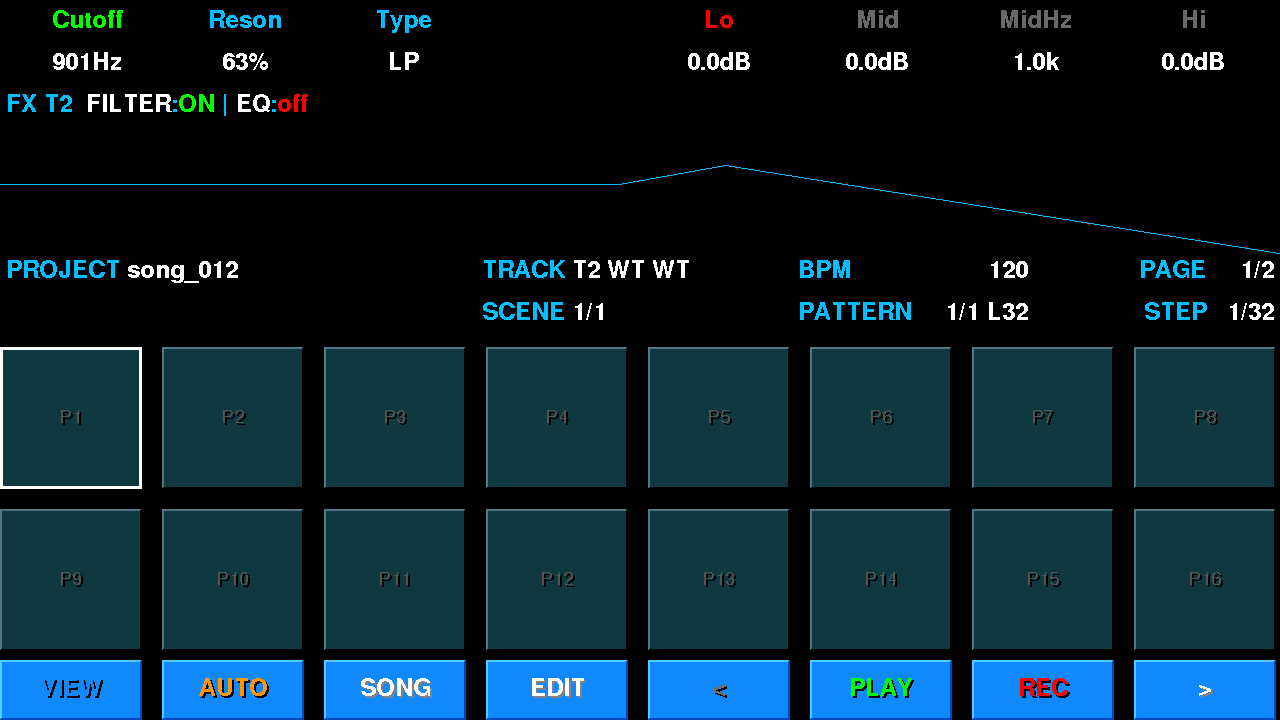
The FX page on the knobs — Sym+F: the eight knobs show two slots at once — FILTER | EQ, Sym+F again — COMP | SAT, a third time — close. Push E0 / E4 (a slot's first knob) to turn the slot on / off: a "traffic light" on the switch knob: name and ring red — the slot is off, push to turn it on; green — on; the other knobs of an off slot are grey; the LCD header reads FILTER:ON | EQ:off. All slots start off. On the FILTER view the LCD draws the filter curve. These knob moves can be recorded with AUTO (§8.1) — a filter sweep, say.
Step p-lock: on the step surface (SEQ) hold a step pad and turn an FX-page knob — the value goes to that step only; the header shows ST n and the locked parameter turns orange. Release — the knobs edit the track again. A tap without a turn toggles the step as usual. Hold a step + push a knob — clear that parameter’s lock; keep the push down over 0.6 s — clear all the step’s locks. Steps with locks carry a cyan corner; up to 4 locks per step.
Sample-slot sends (DLY / CHO / RVB on a sample block page) are taken from each sample before the track’s insert chain: the reverb gets the sound without the track’s FILTER / COMP. That is what lets every slot have its own send (say, reverb on the snare only). On synth tracks the sends come after the inserts.
There is no separate FX window any more: Aa+Sym+F opens the same FX page.
Opened with the EDIT button while the pads show a synth track's presets: SLOTS (Sym+A) or the preset list (L / Alt+L). It works with every synth engine: FM, WT, GRAN, VA, PD.
At the top is the synth channel page: the LCD shows the selected block's knobs, a header and the sound's block diagram (OSC → FILT → AMP → ENV, LFO, NOISE, MOD…). In place of the pads are all instances of the selected block side by side in frames (e.g. OSC 1 | OSC 2 | OSC 3): every value, with a picture underneath — the waveform, the 3D WT table, the PD envelope.
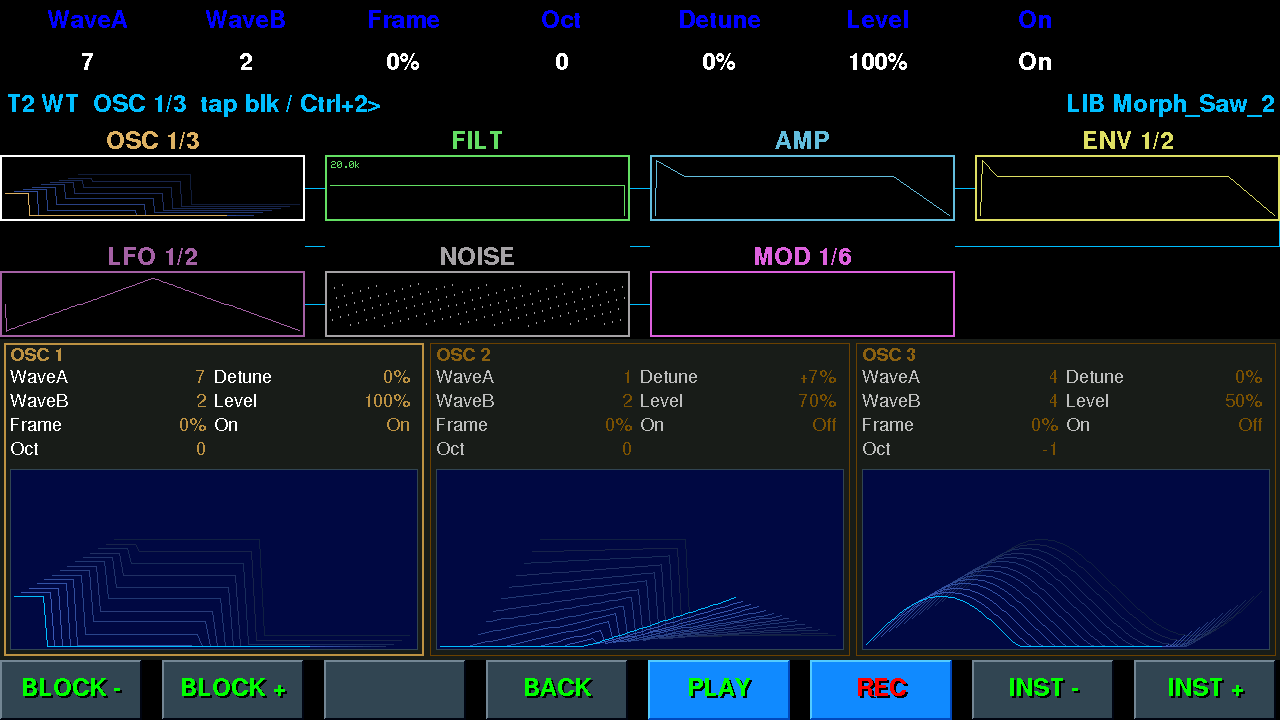
A WT preset from the list “on trial” (LIB Morph_Saw_2): the OSC block is selected, below are three oscillators with 3D tables.
| What | How |
|---|---|
| E0…E7 | parameters of the selected instance; more than 8 — pages (OSC 1 1/3) |
| ↑ / ↓ | previous / next block |
| ← / → | previous / next instance and its pages |
| Tap | a block on the diagram — select it (tap again — next instance); a frame — select that instance; the PD envelope is edited with a finger |
| Bottom row | BLOCK - · BLOCK + · — · BACK · PLAY · REC · INST - · INST + |
| Other keys | play the piano — hear the sound while you edit it |
The right side of the LCD header shows what you are editing:
SLOT 3 name — the active slot's sound (entered from SLOTS, or from the list with no preset picked);LIB name — the preset picked in the list, “on trial”: the track plays it, but the slot doesn't change until you save it into the project;* after the name — the sound has changed since you entered; [ENTRY] — the original sound is playing right now (A/B).Hold Aa — the bottom row turns into an action row:
| Button (holding Aa) | Action |
|---|---|
| 1st > PRESET | save to the library: your own preset — overwrite, a factory preset or a slot sound — a new P<number> (same as Alt+S) |
| 2nd > PROJ | save to the project: the sound → the track's active slot (LCD IN PROJECT: SLOT N); a preset “on trial” becomes the slot's preset |
| 3rd RESET | restore the sound as it was on entry |
| 4th CANCEL (EDIT's place) | restore and leave |
| 5th A/B (PLAY's place) | hear the original sound; again — back to the edit (the button reads EDITED while the original plays). Turning a knob during A/B brings the edit back first. |
Leaving — Esc or BACK: back to where you came from (the list or SLOTS). If a preset “on trial” was changed and not saved,
the first Esc only warns (ESC AGAIN: DISCARD), the second leaves without saving. Any exit from a trial without
> PROJ gives the track back its slot's sound.
Editor messages (SAVED P12, IN PROJECT: SLOT 3…) take the name's place in the header for a couple of seconds.
The eight physical knobs (the 8Encoder unit) are the fast way to shape sound and mix. The LCD's top two rows are always the HUD — one cell per knob, showing what it controls right now.
The knobs are incremental encoders (they spin endlessly): they are always live and move a parameter from its current value. There is nothing to catch — what the HUD shows is what the knob is on, always. Switching knob pages never jumps a value.
These used to be absolute pots, which needed soft-takeover ("pickup"): a knob only came alive after you passed through the current value, and the HUD showed an arrow telling you which way to crank. Encoders make that unnecessary — pickup and the direction hints are gone.
On the base layer each encoder owns its track completely — it is more than a dial:
| Action | What it does |
|---|---|
| Turn | Track N's level (mini-mixer). The scale is logarithmic over 40 dB: 127 = 0 dB, 100 ≈ −8.5 dB, 64 ≈ −20 dB — every detent sounds about the same step (MASTER works the same way). |
| Press (short) | Select track N — same as 1…8, without leaving the knobs. On the already-selected track — open its knob page (pressing again walks the categories). |
| Aa + press | FREEZE track N (§12). |
| Hold (~0.5 s) | Mute track N. |
| Sym + press | Solo track N. |
| LED | Glows in the track colour and flashes while the track plays (§4). |
| Knob page | Open with | The 8 knobs |
|---|---|---|
| Base (mini-mixer) | default | The eight track levels (T1–T8). With a send row armed (D / C / V) they become the Delay / Chorus / Reverb send of each track instead. |
| Channel | The number 1…8 (on the current track) | The selected track's sound parameters, split into categories of 4 (knobs 1–4 = category A, 5–8 = category B). Press the number again to cycle to the next category; after the last one it returns to the base. Category 0 is always ROUTE (TYPE, CH, COLOR, BANK); the rest depend on the track type (Sample: PLAY / ADSR / MIX / LOOP; synth: MIX / SEND / ENV / FILT). |
| Global | 9 or Sym+M | BPM (knob 1), LED STAT / LED DYN (knobs 2 and 3 — LED brightness), screen brightness (knob 4), the three FX returns (Delay / Chorus / Reverb) and MASTER (knob 8). Pressing again walks the pages: FX PARAMS (delay time / feedback, chorus rate / depth, reverb size / damp), SONG (FADE IN / FADE OUT, §12) and CLOCK — the device clock (YEAR · MONTH · DAY · HOUR · MIN, the time is set immediately); after it — exit. |
| Chords & key | 0 | CH.TYPE · CH.BUILD · CH.INVERT · SCALE · ARP.ORDER · ARP.RATE · ROOT (key note 0–11: any scale from any note) · SWING (0–100 %, delays every second step). ROOT and SWING are saved with the project. |
| MOTION | Aa+Sym+U | The current track's automation window (§8.2). |
| Oscilloscope | Sym+O | An output oscilloscope in place of the pads: knob 1 TIME (1–90 ms per screen), knob 2 AMPL (×1–×64). Clipping is drawn in red, with a CLIP n counter. Esc or Sym+O again — close; the settings survive a reboot. |
Two knobs on the global page (9, knobs 2 and 3) set how bright the lights are, each with its own job:
| Parameter | What it drives |
|---|---|
| LED STAT (knob 2) | The steady glow of the indicators: the knob ring (track / parameter colour) and the keyboard backlight. |
| LED DYN (knob 3) | How bright the flashes of playing tracks peak. Set it above STAT so the flashes read clearly. |
This is a device setting, not a project one: it lives in its own
data/settings.json and survives a reboot and a project change (brightness doesn't travel with a
scene).
ENV / FILT on the knobs = the amplitude envelope & main filter. The channel knob page gives you the amplitude envelope (Attack / Decay / Sustain / Release) and, on WT and VA, the main filter (Cutoff / Resonance / Mode / Env-amount). For deeper design — extra envelopes, per-operator settings, the modulation matrix — use the synth editor (EDIT on SLOTS or in the preset list, §7.6).
The LCD's middle band mirrors the knobs: on the ADSR / ENV categories it draws the envelope, on FILT the filter curve, otherwise the sample waveform — so what you see matches what you turn.
A knob move can be recorded into the pattern and replays on every pass, like automation in a DAW. It is armed
separately from notes: Sym+U (LCD AUTO ON; REC records notes only,
so a knob brushed while recording notes changes nothing).
AUTO: <parameter>.Sample-track slots are recordable too: on a sample block page (level, pan, pitch, filter, sends and so on) the recording targets that slot — the MOTION window and the grid strip label the curve with the slot number, e.g. S4 LEVEL. A sample that is already sounding follows the curve at once, without waiting for its next hit — so a long one-hit-per-pattern «stem» can be ridden in level or filter. Edits of a slot variant are not recorded.
AUTOM FULL.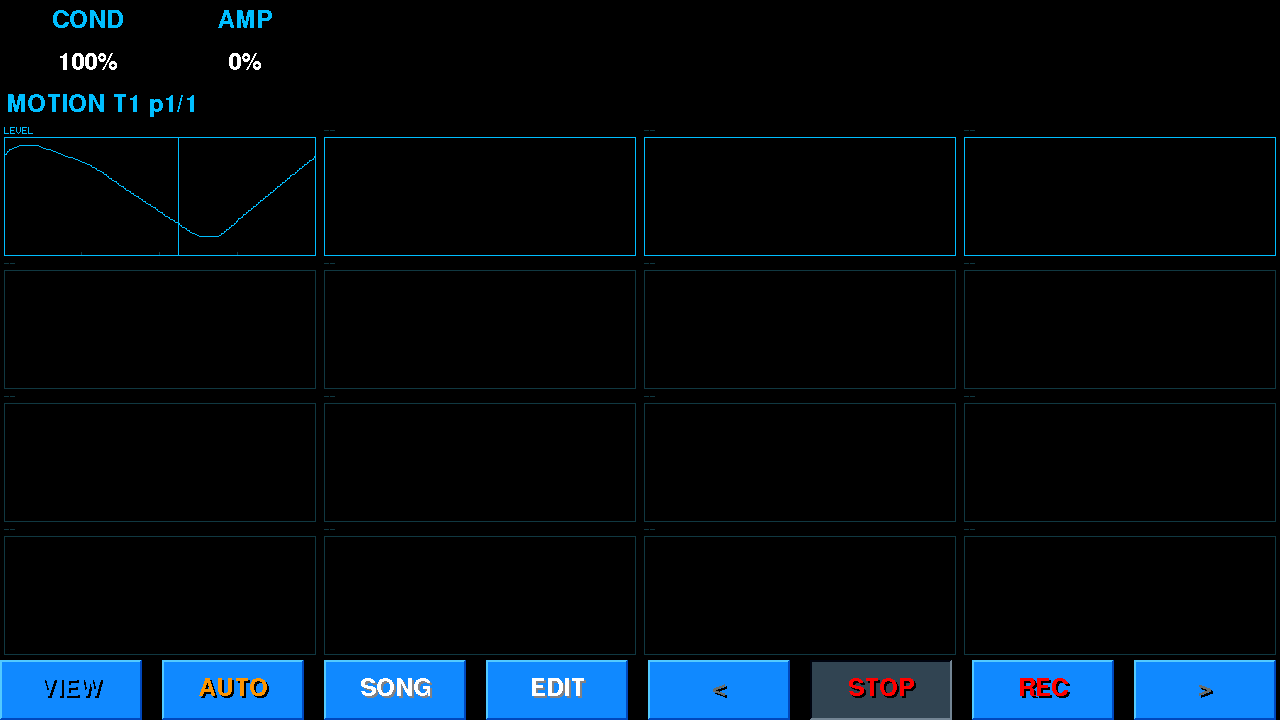
Aa+Sym+U opens the current track's automation window: the pads step aside for 16 windows, 4×4 — one per recorded parameter, each with its curve and a running playhead. Pressing again moves the highlight to the next row; after the last row the window closes.
The highlighted row (4 windows) is on the encoders — one pair per window:
| Encoder of the pair | Action |
|---|---|
| Left — turn | COND: when the curve plays — always (100 %), with 75 / 50 / 25 % probability, or by pass count (1:2 — the first of every two, 3:4 — the third of every four…). On a skipped pass the parameter glides to the value it had before recording, and glides back just as smoothly. |
| Left — short push | GLIDE ↔ STEP: smooth movement between points, or steps (the value holds until the next point). |
| Either — hold 0.6 s | Delete this parameter (DEL <parameter>). |
| Right — turn | VAR (amplitude, 0–100 %, steps of 5): on every pass the curve's swing around its middle changes at random within ±VAR % — same shape, the move is sometimes stronger, sometimes weaker. The change is smooth across the loop seam, no jump. 0 % = the curve plays as recorded. A short press of the right encoder cycles what it turns: AMP (amplitude) → OFS (offset: on every pass the whole curve shifts up or down at random, within ±OFS % of the parameter's full range; works on a flat curve too) → JIT (jitter: smooth random noise of ±JIT % on top of the curve, knots every 2 steps, new on every pass, no jump at the loop seam; a flat curve with JIT becomes a random curve in sync with the pattern). Each has its own value; the name above the encoder shows which one is live. |
| Where | What you see |
|---|---|
| Encoder ring | cyan — the parameter has a recording; orange — your hand took it over until the end of the pass; blinking red — being written now. |
| HUD (channel page) | A before the name — recorded, * — being written; the cell value follows the recording. |
| LCD | AUTO ON / AUTO OFF when toggled (Sym+U); AUTO: <parameter> — which parameter is being written. |
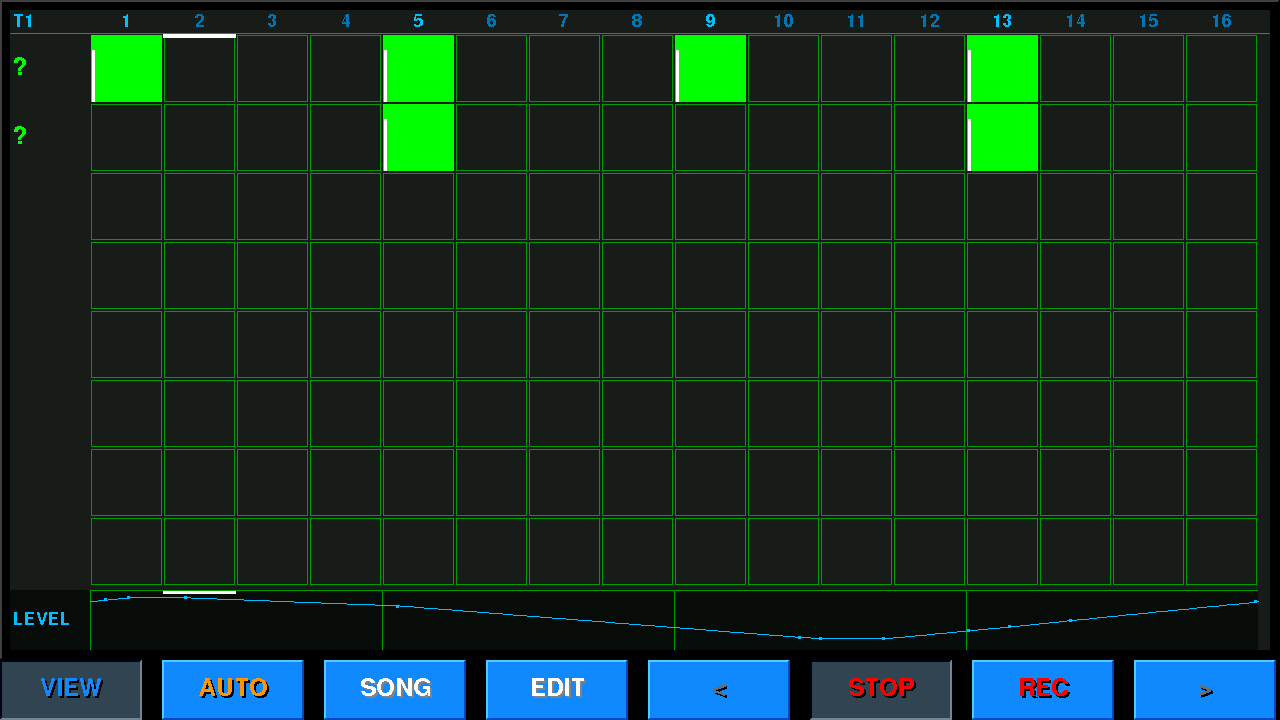
When the pattern has at least one recorded curve, the pattern grid (VIEW) shows an automation strip under the note rows. Its columns are the same steps as the notes: the grid's scroll and zoom move the curve together with the notes, so you see exactly where in the pattern the knob rises against the notes. On the left is the parameter's name; the last touched parameter is shown, a tap on the name switches to the pattern's next curve. Recorded points are small ticks, the playhead runs through the strip too; on a pass skipped by COND the curve is dim. It draws the same curve that plays (without VAR's random spread). No curves — no strip, the grid is as usual. Finger drawing: run a finger along the strip — the shown parameter’s curve is redrawn under it (points on a quarter-step grid; redundant points on straight runs are dropped on release). Use it to fix a recorded curve or draw a new shape over it.
Any Note track can be turned into a generative track: instead of playing its own steps, it listens to other tracks and generates notes in their context — a cross-track, ever-changing part inspired by the Kaleidoscope synth. The track keeps its own sound; "generative" is a mode, not a type. (Sample tracks can't be generative — the GEN controls are greyed there.)
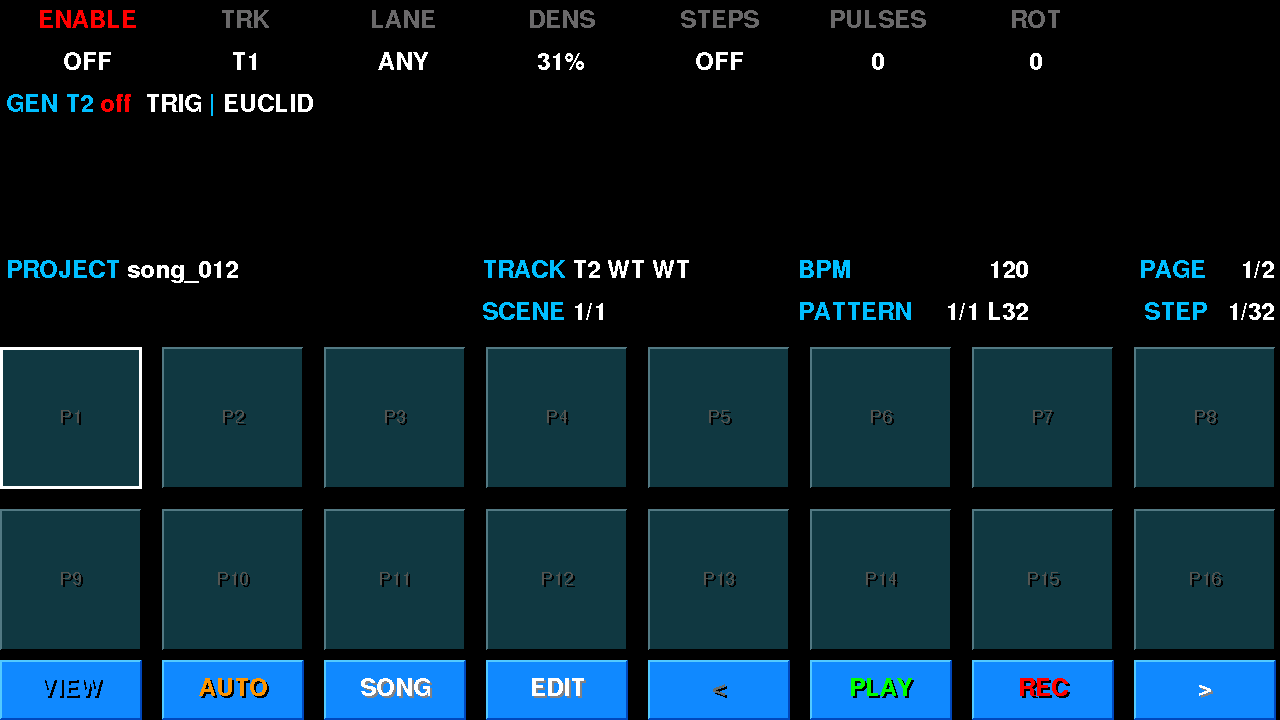
GEN page on the knobs — Sym+G: the eight knobs show two groups at once — TRIG | EUCLID; press Sym+G again for PITCH | RATE, a third time for POOL (T1–T8 on all eight knobs), a fourth time to close. Switches (ENABLE and the POOL tracks) flip with a press of the knob and show a traffic light: red = off, green = on; while GEN is off the other knobs are grey. Moves of these knobs can be recorded with AUTO (§8.1) — e.g. DENS density over the pattern. Ctrl+G and Aa+Sym+G open the same page. Turn ENABLE on to activate the mode:
| Category | Knobs |
|---|---|
| TRIG | ENABLE · TRK (trigger track T1–8) · LANE (ANY / a drum lane) · DENS (density — % of triggers that fire). |
| EUCLID | STEPS (n, 0 = off) · PULSES (k) · ROT (rotation). With STEPS>0 the track fires a euclidean rhythm instead of mirroring a track. |
| PITCH | ALGO (Walk / Sample&Hold / Up / Down) · FOLD (octave fold) · LO / HI (note-window low / high). |
| RATE | GATE (length of generated notes) · VOICES (voices stacked per trigger — a chord from the pool, 1–4) · CLOCK (internal-clock divider, 0 = off). |
| POOL A / B | T1–T8 toggles — lit tracks feed the pitch pool the generator harvests notes from. |
Trigger priority: euclidean > internal clock > mirror. A generative track can also trigger a later generative track (cascade). FREEZE (Ctrl+Alt+G) bakes one pass of the generated output into the track's pattern and turns GEN off — capture a good take, then edit it like a normal pattern.
Each track keeps a pool of patterns (up to 32), and a scene (up to 32 per song) is one chosen pattern per track plus length, colour and offsets. Two pad surfaces manage them: Sym+P and Sym+E (or the SCENES button in the bottom row, or hold Sym → PAT / SCN).
The pads become the current track's pattern pool: a page of 16 — P1…P16 or P17…P32; it follows the active
pattern, and once the first 16 are taken the second page opens. Patterns are in the track colour, captioned P<n>.<len>;
a red border = the one playing now.
The pads become the song's scene list — a page of 16 (S1…S16, then S17…S32; the page follows the current scene by itself).
The caption S<n>.<len> = scene length in steps, in the scene colour. The playing scene has a red border (white when stopped),
the queued one — green.
| Knob | What it does |
|---|---|
| 1 LENGTH | scene length (can't be shorter than the longest active pattern) |
| 2 START | for the current track: in this scene it stays silent until step N and comes in from there, from its own start |
| 3 COLOR | scene colour ("OFF" = no colour) |
| 4 ROT | for the whole scene: the content of every pattern rotates by N steps (nothing is lost); 0 = OFF |
| 5 ROT/PS | rotation added on every pass — the scene drifts by itself (phasing), +n |
| 6 PLAYS | for the current track: the pattern plays N times from its entry, then stays silent until the end of the scene (ALL = no limit). START + PLAYS = a fragment anywhere in the scene. |
SCENE 6 -> 5, the numbers in the SONG chain follow), button 6 — DONE.The full picture — scenes across all tracks at once — is the Arranger (§11).
The arranger is the bird's-eye view of the whole song. Open it with the SONG button (or Sym+S); Esc or SONG again — back to the sequencer. It has three views: MATRIX (scenes × tracks), CHAIN (the scene chain — the song) and EXPORT. Switch by holding Aa: MATRIX · CHAIN · EXPORT · LOOP (loop the song).
Scenes run in columns, every track has its own row with its pattern pool (patterns that don't exist aren't drawn); the selected scene's patterns are filled. Corner badges show a track's non-zero START / PLAYS and the scene's ROT.
| MATRIX | |
|---|---|
| Bottom row | + SCN · CLONE · CHAIN · EDIT (the cell's pattern in the grid; empty — NO PATTERN HERE) · PLAY · PERF/STUDIO · PAGE - · PAGE + (pages — when there are more than 16 scenes) |
| Knobs | E0 SCENE · E1 TRACK · E2 PATTERN (− = none) · E3 LENGTH · E4 START · E5 ROT · E6 ROT/PS · E7 PLAYS (meaning as in SCENES mode, §10) |
| Knob pushes | E0 — launch the scene · E1 — SOLO the track · E2 — clear the cell · E4…E7 — reset to 0 / ALL |
The song is a chain of scenes with repeats (up to 64 positions). PLAY plays the chain; the status line reads SONG 2/5 x1/2 LOOP.
With LOOP the song loops; without it, it stops at the end (with a fade if FADE OUT is set, §12).
| CHAIN | |
|---|---|
| Bottom row | INS · DEL · MATRIX · EDIT · PLAY · LOOP · REP - · REP + |
| Knobs | E0 SLOT (position; push = INS) · E1 SCENE (which scene sits in the position) · E2 REPEAT (how many times) · E7 BPM |
| Hold Ctrl | INS · DEL · … · REP - · REP + |
MIDI import (Ctrl+Alt+I, files from data/import/) fits a song into these limits:
up to 32 scenes and up to 32 patterns per track, up to 128 bars; whatever doesn't fit is cut, and the report says so outright. Repeats are merged on the way in.
Hold Aa → EXPORT (the 3rd button). The panel shows in advance what will be written: how many bars,
where, and the approximate size (~N MB).
| Knob | What |
|---|---|
| E0 SPAN | SONG (the whole chain) or SCENE (one scene — E4 picks which) |
| E1 FORMAT | MIDI (SMF-1) or WAV (24-bit, stereo) |
| E2 FILES | WAV only: MASTER · M+STEMS (master + a file per track and per FX bus in use) · STEMS (no master) |
| E3 LOOP x | WAV only: repeat the SPAN 1–64 times in a row (MIDI is always one pass) |
| E4 SCENE | the scene for SPAN = SCENE |
START (in PLAY's place, or push E0) runs it; while rendering, the same place reads CANCEL with a percentage. Bottom row: MATRIX · CHAIN · — · — · START.
Where it lands: everything goes to data/export/ — export_NNN.mid, export_NNN_master.wav,
export_NNN_T01_LEAD.wav (track number and name), export_NNN_fx_delay.wav. NNN is the next free number —
an export never overwrites an earlier one. In MIDI, samples go out as notes 36 + slot (pad 1 = C1). A short tail is appended to a WAV
so reverb decay and delay repeats are not cut off.
What will NOT be in the files. A stem is written only for a track that is named and audible: one muted, or suppressed
by another track's solo, gets no file — it would be silence. Same for buses: no fx_reverb.wav if nothing sends to the reverb
or its return is closed. The report says so explicitly (BASS MUTED - NO STEM, reverb UNUSED - NO FILE).
While a WAV export runs the instrument does not respond to playing: pads, keys, incoming MIDI and auditions stay silent —
otherwise they would land in the files. The export runs faster than real time; the transport stops for the duration. A file over 4 GB
is not written: the panel shows TOO LONG >4 GB.
There is no separate mixer screen — mixing is folded into the knobs and the LCD:
The global page (9), third tab SONG: two values in bars (0 = off, up to 32). The MASTER knob does not move during a fade — the fade works on top of it.
FREEZE takes load off the CPU: the track stops playing its engine and plays a recording of its own sound instead. It is a compromise for live playback — use it when so many tracks and voices play that the sound starts to crackle.
| Action | How |
|---|---|
| Freeze a track | Shift + push of that track's encoder (base knob page, knob N = track N), or Sym+Z for the current track. |
| Cancel while recording | The same again — the track stays live. |
| Unfreeze | The same again once the track is frozen (the cell shows F). Instant. |
| Queue | While one track is recording its freeze, the same gesture on another track puts it in the queue
(LCD T3 QUEUED); queued tracks are recorded one at a time, one after another. Repeat the gesture on a queued track to take it out of the queue. |
Projects (scenes, patterns, sample references, synth settings, mix) are saved to the SD card as
.gps files in /data/songs/.
| Key | Action |
|---|---|
| Ctrl+S | Save the current project (auto-numbered). It is written in the background — the music doesn't stop
(PROJECT: SAVING... → PROJECT: SAVED). |
| Ctrl+Alt+S | Save As — type a name. |
| Ctrl+L | Load a project (browse the list). |
| Ctrl+N | New Project. |
| All three actions that replace the open song — New Project, Load and MIDI import (Ctrl+Alt+I) — ask first when there are unsaved edits: SAVE & … / … / CANCEL. If the save fails, the song is left alone. | |
Saves are verified. Every file is checked after writing; if that fails — PROJECT: SAVE FAIL,
and the previous file is untouched. The previous version stays alongside as <name>.gps.bak; if a project is damaged,
that one is loaded (PROJECT DAMAGED - BACKUP LOADED). The project also stores the sound of every synth slot (§5).
Ctrl+Z undoes the last action, Ctrl+Alt+Z redoes it. An action is one key press, one tap (a touch from press to release — e.g. a curve drawn with a finger) or a knob turn (turning one knob without pausing for more than a second is one action). The last 64 actions are kept.
UNDO: NOTES T1, UNDO: SOUND T2, REDO: …. The view does not switch.FROZEN - unfreeze to edit) — just as it cannot be edited.Plug a USB stick into USB-A and press Ctrl+U: BACKUP — copy from the device's card to the stick,
RESTORE — the other way. What to copy: FULL · SAMPLES · PROJECT ·
PRESETS · EXPORT · IMPORT. The NO DELETE switch — don't delete files on the destination
that aren't in the source. At the bottom — a copy / skip / err count. Esc closes.
kick-808) to audition it and make it the active brush.data/export/: take the card out, copy them to a USB stick (Ctrl+U, §12) or fetch them over WiFi (§16).The master volume does not affect the file: an export is always written
at unity, otherwise a quietly-turned-down speaker would give you a quiet file. If the card is short of
room, the export refuses before starting and shows the numbers
(NEED 412 MB, FREE 380 MB) instead of dying halfway.
LIB name on the right of the header..gps); Ctrl+Alt+S saves under a typed name; Ctrl+L loads; Ctrl+N starts a new project (§12).The M5Stack Tab5 Keyboard (70 keys, attaches over I2C) is the primary control surface — it works alongside the touch screen and knobs. It has four physical modifiers (Ctrl, Alt, Sym, Aa / Shift) that stack (e.g. Ctrl+Alt+X). The active screen decides what the keys do; below is the map on the main sequencer screen.
| Key(s) | Action |
|---|---|
| Space | Play / Stop. |
| Aa+Space | Soft stop: fade out over FADE OUT bars, then stop (§12). |
| Ctrl+Space | PANIC — silence all notes, release HOLD. |
| Ctrl+R (or Sym+R) | Toggle note recording. |
| Ctrl+M | Metronome on / off. |
| Ctrl+Q | Live-record quantize: OFF → 1/4 → 1/8 → 1/16 → 1/32. |
| Sym+U | Toggle AUTO — knob motion recording (§8.1). |
| 1…8 | Select track T1–T8; on the already-selected track — open its knob page; pressing again walks the sound categories, after the last one — back to the base. |
| 9 / 0 | Global knob page (BPM, brightness, FX, master, fades, clock) / chords & key (ROOT, SWING…). |
| Ctrl+1…8 / Alt+1…8 | SOLO / MUTE track T1–T8. |
| Ctrl+Alt+R | Record everything you play to a .mid (start / stop, from any screen) → data/export/rec_<date>_<time>.mid; sample hits go out as notes 36 + slot. |
Sym+letter jumps straight to a pad surface, mode or knob page (the mode name on the LCD updates). The eight main jumps are also on the bottom row — hold Sym (§2).
| Key | Goes to |
|---|---|
| Sym+A | PADS (the kit, sample track) / SLOTS (16 preset slots, synth track, §5). |
| Sym+Q | SEQ — the step lane (STEPS). |
| Sym+K | KEYS — chromatic keyboard (same as a bare K). |
| Sym+P | PATTERNS — the track's pattern pool (§10). |
| Sym+E | SCENES — the scene list (§10), like the SCENES button. |
| Sym+I | Same as the EDIT button (§7). |
| Sym+F | FX page on the knobs (FILTER | EQ, again — COMP | SAT). |
| Sym+G | GEN page on the knobs (TRIG | EUCLID, again — PITCH | RATE, then POOL). |
| Sym+M | MIXER knobs (the global page — returns / master). |
| Sym+S | SONG — the Arranger (§11). |
| Sym+R | Toggle REC. |
| Sym+X | PERF-FX page (live-effect pads). |
| Sym+O | Output oscilloscope (§8). |
| Sym+U | Toggle AUTO (knob motion recording). |
| Aa+Sym+U | The MOTION window (§8.2). |
| Sym+Z | FREEZE the current track. The main gesture is Aa + push the track's encoder (§12). |
| Key(s) | Action |
|---|---|
| ` (grave / tilde, top-left) | Toggle the 2×8 pads between the instrument and SEQ. Instrument = play the sound (samples / KEYB); SEQ = the step lane (a tap places / clears steps). The LCD shows PADS / KEYB / STEPS. |
| K / L | KEYS keyboard / browser: on a sample track CHOOSE (SD samples + the KITS lane), on a synth track — the preset list (§5). Press again = exit. |
| Alt+L | Preset list straight in the user bank (synth track). |
| Letter keys (2-octave piano) | Musical typing. The top two letter rows form a two-octave piano laid out like a real one. White keys (naturals) = the QWERTY row: left→right TAB Q W E R T Y U I O P ; ' BS play C D E F G A B twice. Black keys (sharps) = the symbol row right above it: !=C#, @=D#, $=F#, %=G#, ^=A#, then * ( [ ] \ for the next octave — sitting between the whites, with the natural gaps at E–F and B–C. Under REC + stopped = step input; under REC + playing = live record. |
| − / + | Octave down / up (shifts the whole piano and KEYS). |
| Ctrl+H / Ctrl+O | HOLD (latch KEYS notes) / CHORD on / off. |
The same 2-octave piano also plays in the synth editor (§7.6) — hear the sound while you edit it (the arrows there are busy picking the block and instance).
| Key(s) | Action |
|---|---|
| Ctrl+I | Toggle the pattern grid (like the VIEW button). |
| Ctrl+E | Same as the EDIT button: synth editor / SAMPLER / grid — depending on what is on the pads (§7). |
| Ctrl+A | In the grid — select all notes of the pattern (§7.2). |
| Ctrl+T | New track (type picker). The track's knob page is the bare track digit. |
| Ctrl+Alt+I | Import a MIDI file (data/import/*.mid) — it replaces the open song rather than merging in: tracks go to VA, repeats are merged, a report on the LCD. |
| Ctrl+F | Toggle step-follow — while playing, the step-pad window follows the playhead (handy for long patterns — up to 128 steps). |
| Ctrl+G | The GEN page on the knobs (like Sym+G). |
| Ctrl+Alt+G | FREEZE the generator — bake the generative output into the pattern. |
| Ctrl+W | Open the SAMPLER workbench (Sample tracks only — record / trim / chop / edit; stops the transport on entry). |
| Ctrl+K | Save as kit (Sample track): type a name — the track's 16 slots are saved to /data/kits/<name>.kit. Same as the “+ SAVE KIT” pad in CHOOSE→KITS. |
| Alt+S | On a synth track — save the slot's sound as a preset: overwrite the slot's own preset, otherwise a new P<number> linked to the slot (§5). (Ctrl+S = save the project.) |
| Alt+Z | On a synth track — RESET: give the slot back its library preset's sound (asks first). |
| Ctrl+Alt+P | Screenshot → data/screenshots/shot_<date>_<time>.bmp (from any screen, LCD SHOT: …). |
| Key(s) | Action |
|---|---|
| Ctrl+C / V / X | In PATTERNS / SCENES mode — copy / paste / cut a pattern or a scene. On the sequencer Ctrl+C = copy the pattern to a new slot. |
| Ctrl+P | NEW empty pattern in the pool. |
| Ctrl+Backspace | CLEAR the pattern's / scene's notes. |
| Ctrl+X | X2 — double the pattern length (the start is copied over the tail). |
| Ctrl+Alt+X | /2 — halve the pattern (notes past the length are kept). |
| Ctrl+D | Delete the whole track (a confirm modal — clears it from every scene). |
| Del | In PATTERNS — delete the active pattern; on a Sample track — delete the brush sample / selected variant. |
| Ctrl+Aa+R | Delete the recorded knob moves of the current track in the current pattern. |
| Key(s) | Action |
|---|---|
| Ctrl+Z / Ctrl+Alt+Z | Undo / redo the last action (§12). |
| Ctrl+S | Save the project (in the background, verified, with a .bak, §12). |
| Ctrl+Alt+S | Save As — type a name, Enter = confirm, Esc = cancel. |
| Ctrl+L | Load — browse (↑/↓, Enter = load, Del = delete the file, Esc = cancel). |
| Ctrl+N | New Project (offers to save if there are unsaved edits). |
| Ctrl+U | USB archive: BACKUP / RESTORE to a USB stick (§12). |
| Key(s) | Where | Action |
|---|---|---|
| Alt+H | Anywhere | Full-screen HELP for the current mode — a hotkey cheat sheet. Esc or Alt+H closes it. |
| Esc | Any overlay | Close the top overlay / window (innermost first). |
| hold a modifier | Any screen | The bottom row shows the modifier's functions (§2). |
| ← → / ↑ ↓ | Grid | ↑/↓ = row (one at a time); ←/→ = step cursor. |
| ← → / ↑ ↓ | Synth editor | ↑/↓ = block; ←/→ = instance and its pages. |
| Arrows + Enter | Sample / preset browser | ↑/↓ scroll, ←/→ (or < >) page, Enter = take the auditioned sound. |
LEDs: the LEDs on the knob unit show status — a progress bar at boot, then the track / parameter colour and flashes of the playing tracks (§4, §8).
| Item | Value |
|---|---|
| Device | M5Stack Tab5 (ESP32-P4, dual-core RISC-V up to 400 MHz) |
| Display | 5" IPS TFT, 1280×720, GT911 multi-touch |
| Memory | 16 MB Flash, 32 MB PSRAM |
| Audio | ES8388 stereo codec, 1 W speaker, 3.5 mm jack |
| Microphone | Dual mic array (used for sampling) |
| MIDI | USB-A host, in and out, via a hub, hot-plug; recording what you play to .mid, MIDI export and import. BLE MIDI — planned |
| Connectivity | WiFi (via the ESP32-C6): card files in a browser, NTP clock, firmware update |
| Storage | MicroSD (projects, samples, soundfonts) |
| Control surfaces | Tab5 Keyboard (70 keys, I2C) — the main command surface (§15); 8Encoder unit (8 encoder knobs: push switch + RGB LED) |
| Tracks | 8, each Sample / FM / WT / Granular / VA / PD / external MIDI |
| Pattern length | 1–128 steps (default 16) |
| Song | up to 32 scenes, up to 32 patterns per track, SONG chain — up to 64 positions |
| Synth engines | FM (6-op), Wavetable, Granular, Virtual Analog, Phase Distortion |
| FX | Delay, Chorus, Reverb sends + per-track insert chain |
| Project format | .gps (JSON) on SD under /data/songs/ |
| Automation | up to 16 parameters per pattern; GLIDE / STEP; COND (probability, X:Y); VAR (amplitude, offset, jitter ±%) |
Not in this build yet: MIDI Learn, MIDI clock, waveform zoom and finger editing.
On the mode-select screen at power-on — tile 5 (or the 5 key): WIFI FILES.
The device joins the network and shows an address: open it in a browser on a computer or phone on the same network —
it is the card's data/ folder, and you can download and upload files (samples, projects, exports). The device clock
is set from the network (NTP) along the way. Exit with Esc: the screen shows please restart with the button — restart the device with its button.
Updating over WiFi: in WIFI FILES press U — the device shows its own version and the one on the server;
Enter installs the new one, Esc goes back. The server address is taken from the data/update.json file on the card.
After installing, restart the device with its button.
| escback | 1track 1 · knobs | 2track 2 · knobs | 3track 3 · knobs | 4track 4 · knobs | 5track 5 · knobs | 6track 6 · knobs | 7track 7 · knobs | 8track 8 · knobs | 9global knobs | 0SCALE·CHORD·ARP | −octave − | +octave + | deldelete |
| `pads: instr↔SEQ | !C♯ | @D♯ | # | $F♯ | %G♯ | ^A♯ | & | *C♯ | (D♯ | ) | [F♯ | ]G♯ | \A♯ |
| tabC | QD | WE | EF | RG | TA | YB | UC | ID | OE | PF | ;G | 'A | ⌫B |
| sym | Aa | A | S | D | F | G | H | J | KKEYS | Lbrowser | ▲up | _ | ↵enter |
| ctrl | alt | Z | X | C | V | B | N | M | . | ◀left | ▼down | ▶right | ␣play / stop |
| esc | 1SOLO track | 2SOLO track | 3SOLO track | 4SOLO track | 5SOLO track | 6SOLO track | 7SOLO track | 8SOLO track | 9 | 0 | − | + | del |
| ` | ! | @ | # | $ | % | ^ | & | * | ( | ) | [ | ] | \ |
| tab | Qrec quantize | Wsampler | EEDIT | RREC | Tnew track | Y | UUSB archive | IGRID | Ochord CHORD | Pnew pattern | ; | ' | ⌫clear |
| sym | Aa | Aselect all (grid) | Ssave project | Ddelete track | Fstep-follow | GGEN | HHOLD (latch) | J | Ksave kit | Lload | ▲ | _ | ↵ |
| ctrlheld | alt | Zundo | Xcut / ×2 | Ccopy | Vpaste | B | Nnew project | Mmetronome | . | ◀ | ▼ | ▶ | ␣PANIC |
| esc | 1MUTE track | 2MUTE track | 3MUTE track | 4MUTE track | 5MUTE track | 6MUTE track | 7MUTE track | 8MUTE track | 9 | 0 | − | + | del |
| ` | ! | @ | # | $ | % | ^ | & | * | ( | ) | [ | ] | \ |
| tab | Q | W | E | R | T | Y | U | I | O | P | ; | ' | ⌫ |
| sym | Aa | A | Ssave preset | D | F | G | Hhelp HELP | J | K | Luser presets | ▲ | _ | ↵ |
| ctrl | altheld | Zreset patch | X | C | V | B | N | M | . | ◀ | ▼ | ▶ | ␣ |
| esc | 1 | 2 | 3 | 4 | 5 | 6 | 7 | 8 | 9 | 0 | − | + | del |
| ` | ! | @ | # | $ | % | ^ | & | * | ( | ) | [ | ] | \ |
| tab | QSEQ (STEPS) | W | ESCENE mode | RREC | T | Y | UAUTO | IEDIT | Ooscilloscope | PPATTERN mode | ; | ' | ⌫ |
| symheld | Aa | APADS / SLOTS | SSONG (arranger) | D | FFX page | GGEN | H | J | KKEYS | L | ▲ | _ | ↵ |
| ctrl | alt | ZFREEZE | XPERF-FX | C | V | B | N | Mglobal knobs | . | ◀ | ▼ | ▶ | ␣ |
| esc | 1 | 2 | 3 | 4 | 5 | 6 | 7 | 8 | 9 | 0 | − | + | del |
| ` | ! | @ | # | $ | % | ^ | & | * | ( | ) | [ | ] | \ |
| tab | Q | W | E | R | T | Y | U | I | O | P | ; | ' | ⌫ |
| sym | Aaheld | A | S | D | F | G | H | J | K | L | ▲ | _ | ↵ |
| ctrl | alt | Z | X | C | V | B | N | M | . | ◀ | ▼ | ▶ | ␣ |
How to read: the 5×14 layout, as on the device; in each cell the key symbol is on top, the function in this layer below (in red). In every table the held modifier is dark with an orange border; the grey ctrl/alt/sym/Aa are the other modifiers (not held in that layer). Print in landscape.
Two-modifier combos: Ctrl+Alt+G — FREEZE (bake the generator); Ctrl+Alt+X — /2 (halve the pattern); Ctrl+Alt+S — Save As; Ctrl+Alt+I — MIDI import; Ctrl+Alt+R — record what you play to .mid (start / stop); Ctrl+Alt+P — screenshot; Ctrl+Alt+Z — redo; Ctrl+Aa+R — erase knob moves; Aa+Sym+U — the MOTION window. Hold one modifier — the bottom button row shows its functions (§2).
An empty lower cell = the key is unbound in this layer (or is context-dependent). In the base layer the letter rows play as a 2-octave piano; digits 1–8 = select track (re-tap rings the track's knob pages), K = KEYS, L = browser.